Fish Shell for Developers
Introduction
The Fish shell, short for the “Friendly Interactive Shell,” is a powerful and user-friendly alternative to traditional Unix shells like Bash and Zsh. Designed with an emphasis on user experience, Fish provides out-of-the-box features that enhance command-line productivity. In this article, we explore why Fish is a great choice for your everyday terminal tasks! This guide is great for anyone who is looking to enhance their productivity on command line!
Pros
- Works great out of the box. Stable.
- Easy to use and configure.
- Best auto-complete features based on history.
- Available for all major operating systems and distributions.
- Fish stores its configuration files in the ~/.config/fish/ directory, which follows the XDG Base Directory Specification. This helps keep the home directory organized.
Cons
- Not POSIX compliant, which means scripts written in Fish will not be portable to other POSIX-compliant shells without modification. Therefore, Fish is not great for scripting.
Useful Plugins
1. Fisher
A plugin manager for Fish—your friendly interactive shell. Snag fresh plugins!
- Makes it easy to install, uninstall and manage plugins. You might not need this one especially since you probably do not need to use much plugins for Fish but I like the ease of use.
2. fzf.fish
Augment your Fish command line with mnemonic key bindings to efficiently find what you need using fzf.
fisher install PatrickF1/fzf.fish- fzf.fish complements the fish’s built-in auto-complete features.
- Provides many search utilities based on fzf.
- Directory: Search recursive listing of current directory’s non-hidden files.
- Git Log: Search the current repository’s formatted git log.
- Git Status: Search the current repository’s git status.
- History: Search Fish’s command history.
- Processes: Search the pid and command of all running processes, outputted by ps.
- Variables: Search all the shell variables currently in scope.
Note: Descriptions for the search utilities are taken directly from the original Github repository.
3. fish-ssh-agent
Utility functions to start your ssh agent when using fish shell. You will only need to run ssh-add and type your password once, after the running ssh_agent should do the work for you.
fisher install danhper/fish-ssh-agentThat’s all! You do not need loads of plugins and configure each of them to work with Fish. All main features are supported out of the box.
Tips
1. Interactive session only configuration
Use this setup to define variables for interactive sessions only, ensuring they don’t interfere with non-interactive scripts.
# This lets you only define variables for the interactive session:
if status is-interactive
    pyenv virtualenv-init - | source
end
2. Defining environment variables
Setting environment variables is straightforward in Fish. Here are some examples:
set -U fish_greeting # disable greeting message

set -gx EDITOR nvim # Global Variable
set -gx SUDO_EDITOR nvim
set -Ux XDG_DATA_HOME $HOME/.local/share # Universal variable, persisted on disc
# ...and other environment variables
3. Startup functions
Customize your Fish shell with startup functions to load plugins and configure key bindings.
fish_ssh_agent
fish_vi_key_bindings # use vim keybindings, default mode is emacs
# third party applications (you need to install them first)
pyenv init - | source
starship init fish | source # great cross-shell prompt that you can check out
# ...and other applications you need
4. Update PATH
Updating your PATH ensures all necessary binaries are easily accessible.
fish_add_path -p /bin
fish_add_path -p /usr/bin/ /usr/local/bin /usr/local/sbin /usr/bin /usr/sbin
fish_add_path -p /home/bahadir/.cargo/bin
fish_add_path -p /home/bahadir/.local/bin
fish_add_path -p $GOPATH/bin
fish_add_path -p $JAVA_HOME/bin
fish_add_path $PYENV_ROOT/bin
5. Create Aliases
Creating aliases can significantly improve your command-line efficiency. Here are a few examples:
alias ll "ls -alF"
alias vim "nvim"
alias lgit "lazygit"
alias gst "git status"
6. Custom functions
Custom functions can automate repetitive tasks. Here’s an example of a useful function I used frequently during my time as a student:
# This useful function opens up an interactive fzf instance
# where you can choose a pdf or djvu file and open it using zathura, lightweight pdf reader.
function pdf
    nohup zathura "$(fd -e pdf -e djvu --type f | fzf)" &>/dev/null &
end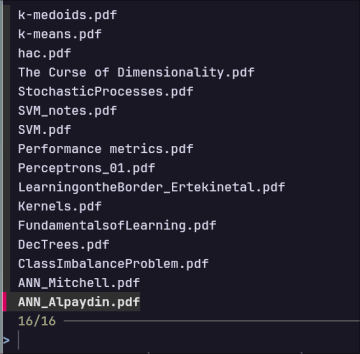
7. Web Based Configuration
Although I don’t use this feature much Fish offers a web-based configuration tool that allows users to customize their shell easily via a web interface. You can use this tool to graphically modify your configuration. This will open up a new tab in your browser:
fish_configConclusion
In this article, I shared my tips for using the Fish shell, a powerful and user-friendly alternative to traditional Unix shells like Bash and Zsh. Fish offers excellent out-of-the-box features, such as advanced auto-completion and a straightforward configuration structure, which enhance command-line productivity. While it isn’t POSIX-compliant and thus not ideal for scripting, its interactive features make it a great choice for everyday terminal use.
In future articles, I’ll also discuss additional tools like zoxide and direnv that you can integrate into your Fish configuration for increased productivity. I appreciate any feedback, and stay tuned!